

A time clock that only records punches leaves half the job undone. An hourly employee time clock should capture work hours and breaks, then turn those records into useful weekly reports and overtime reviews, while keeping shift assignments connected to the hours they cover.
Ease of use matters, too. Your crew needs a clear way to clock in and out, and you need records that don’t lead to chasing missed punches, sorting out break entries, or rebuilding schedules by hand.
This guide explains how to record work hours and breaks, organize time in weekly reports, handle overtime, and connect shift assignments to clock-ins. You’ll also learn what makes a time clock practical for daily use, from clear punch records to schedules your team can follow, so you can assess whether it fits the way your hourly crew works.
Key Takeaways
- Keep work and break entries together so weekly hours are easier to review.
- Learn what to look for when reviewing weekly totals and overtime.
- Connect shift assignments with clock records to make schedule changes easier to follow.
- See how a time clock and scheduling app can bring these tasks into one routine.
Overtime for hours worked over 40 per week
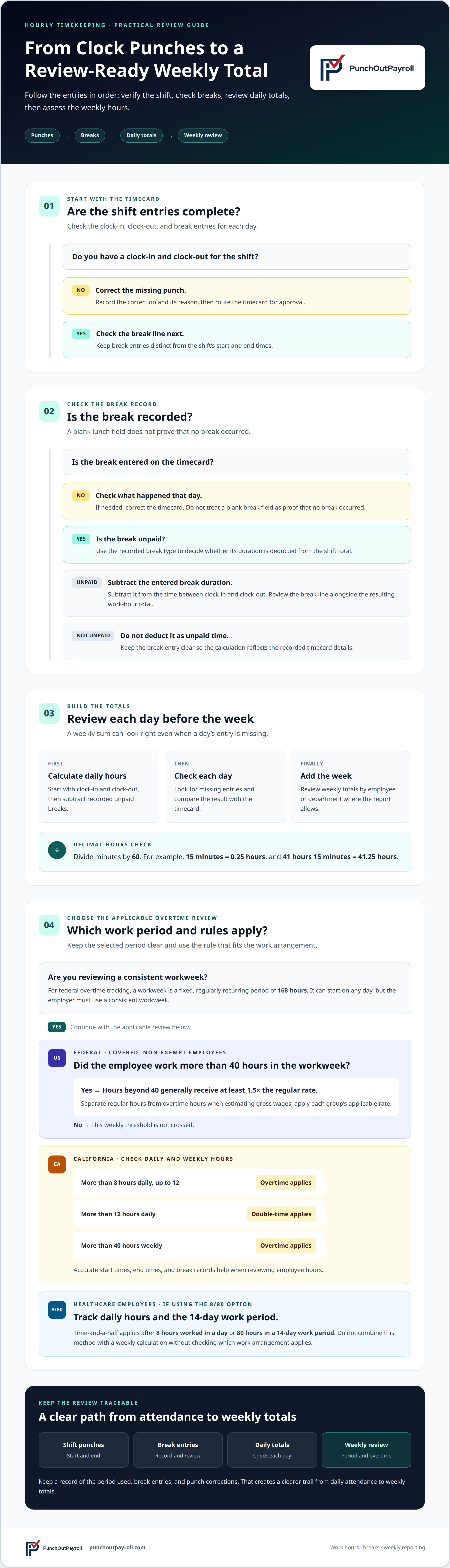
For covered, non-exempt employees, federal overtime generally means at least 1.5 times the regular rate for hours worked beyond 40 hours in a workweek. The U.S. Department of Labor defines a workweek as a fixed, regularly recurring period of 168 hours. It can start on any day, but the employer must use a consistent workweek for overtime tracking.
California has additional daily calculations. According to the California Department of Industrial Relations, overtime applies after 8 hours daily and up to 12 hours of work. Double-time applies after 12 hours daily. California overtime also applies after 40 hours weekly. These rules make accurate start times, end times, and break records useful when reviewing employee hours.
The U.S. Department of Labor states the federal minimum wage under the Fair Labor Standards Act was $7.25 per hour as of January 2026. To estimate gross wages, separate regular hours from overtime hours, then multiply each group by its applicable rate. For example, calculate overtime pay using the employee’s regular rate multiplied by 1.5. A card calculator can help organize the arithmetic, but it doesn’t establish which hours count.
Healthcare employers may use the 8/80 option: time-and-a-half applies after 8 hours worked in a day or 80 hours in a 14-day work period. Track the selected period and daily totals carefully. Don’t combine this method with a weekly calculation without checking which work arrangement applies.
Employees may clock in through phone apps or shared tablets; web clocks, PINs, and biometric methods are other possible setups. Remote clock-ins and geofencing depend on the system. Explain any location data collection, limit it to work needs, and restrict access. For missed punches, record the correction and its reason, then route the timecard for approval. Time clocks can log breaks and work hours; shift differentials depend on pay rules for qualifying shifts.
Weekly time reports and time-card calculations
Weekly reports turn daily punches into totals you can review by employee or department. Start the calculation with recorded work hours, subtracting any unpaid breaks.
Daily and Weekly Hour Totals
Start with each day’s clock-in and clock-out entries, then subtract unpaid break time. A timecard calculator can show daily totals and add them into a weekly total. Review both: the weekly sum may look right even when a day’s entry is missing. For a clear attendance report, group work by employee, department, or schedule, where the tool allows.
Time-Card Calculations
A timecard calculator can total punches, subtract entered unpaid breaks, and display daily and weekly hours. To convert minutes into decimal hours, divide the minutes by 60. For example, 15 minutes equals 0.25 hours, and 41 hours and 15 minutes becomes 41.25 hours. You can choose a pay period of one week, two weeks, semimonthly, or monthly. Print or save a completed card as a PDF using your browser’s Print option.
Payroll and Employee Hours
Hours are an input to payroll, not a complete payroll calculation. To estimate gross wages, separate regular and overtime hours, then apply each employee’s pay rates. To compare labor by department, group hours by team and apply the relevant rates. A timecard total alone won’t show payroll taxes. Use reports to spot missing punches or unusual totals before approving hours.
Keep a record of the period used, the break entries, and any punch corrections. That gives you a clearer trail from daily attendance to weekly totals. If you’re organizing hours alongside shifts, employee time tracking records can keep those details connected in one routine.
Calculating work hours and breaks
Accurate work-hour totals depend on complete start, end, and break entries. A timecard calculation should make clear what counts as worked time and what is deducted.
Unpaid Break Deductions
For an unpaid break, enter its duration separately from the employee’s work time. Subtract that duration from the time between clock-in and clock-out to calculate the day’s total. Compare the result with the timecard before using it for billable work or payroll.
Manual calculations can miss a break entry or subtract it twice. A computer can total the entries, but accuracy still depends on recording the break correctly. Review the break line alongside the resulting work-hour total.
Including Lunch Breaks
Include lunch in the calculation when it is recorded as a break. Keep its start and end entries distinct from the shift’s clock-in and clock-out times. The timecard calculator uses the entered unpaid break to adjust the daily total, making it easier to see how lunch affected the hours recorded for that shift.
Don’t treat a blank lunch field as proof that no break occurred. Check the day’s entries and correct the timecard if needed. Clear break records help you compare scheduled time with the employee’s recorded time.
Use a consistent sequence: enter shift times, add unpaid breaks, then review the daily total. A calculator may let you round clock times to the nearest 5 minutes or 6 minutes. The 6-minute interval is also called one-tenth of an hour. A 15-minute rounding interval is described as the 7-minute rule. These settings affect displayed totals, so review the selected option before using results.
For a decimal-hours check, 0.75 hours equals 45 minutes. Compare that conversion with the timecard’s displayed amount. If you track billable work, also keep the time assigned to each job separate. That gives you a clearer view of which hours belong to each task, rather than relying on one daily total.
Scheduling shifts and assignments
A schedule shows who should work, where they’re assigned, and when each shift starts. A predictable 9-to-5 job may need a steady pattern; restaurant, cleaning, or construction shifts can change with daily coverage needs. Keep the assignment clear before the shift begins. That gives managers a reference point when they review hours worked later.
Start with the work that needs coverage. List each shift, its location, and the role or task involved. Assign an employee, then share the schedule somewhere the team can find it. For example, a cleaning crew might need separate assignments for two job sites. Clear labels show employees where to report and help managers spot uncovered shifts.
When plans change, update the schedule record instead of relying on a hallway conversation. Note the replacement employee, revised shift time, and assignment location. This creates a useful record for comparing planned shifts with the timesheet. It also helps managers follow up when a punch doesn’t match the schedule, without guessing which shift the employee worked.
Keep scheduling and attendance records connected in your review routine. First, check the scheduled assignment. Then compare it with the employee’s recorded start and end times. Finally, note any approved changes before reviewing the timesheet. These steps simplify handoffs between managers and help prevent errors caused by outdated schedules or unclear assignments.
Good scheduling also supports better planning. Look for repeated gaps, frequent changes, or shifts that regularly run past their planned end. Use those patterns to adjust upcoming assignments, rather than assuming every shift will go exactly as planned. A clear schedule provides a useful starting point; recorded hours show what happened on the job.
PunchOutPayroll: Time clock and scheduling app
PunchOutPayroll offers a time clock and scheduling app for hourly teams. It brings shift planning and clock records into the same routine, so you can review scheduled shifts alongside employee hours. Use it when paper notes, separate schedules, and time records create extra work for managers.
The app’s timekeeping and scheduling tools support your team’s daily work, from a retail floor to a job site. It helps organize hours and schedules, but it doesn’t process payroll or file payroll taxes.
To talk through your team’s timekeeping needs, contact PunchOutPayroll.
Choose a setup your team can keep using
Your timekeeping setup should fit the way your business actually runs. As your team changes, make sure managers can keep schedules and records clear without adding more manual work. The right hourly employee time clock is one your crew can use consistently and your managers can review without chasing scattered details.
Before changing your routine, identify where work gets tangled. Maybe a schedule change doesn’t reach everyone, or punch records need too much cleanup. These friction points can help you decide what to address first and what a practical setup needs to support.
PunchOutPayroll’s team brings practical expertise in timekeeping and scheduling for hourly teams. If you’re ready to discuss your needs, contact PunchOutPayroll. A clearer routine can start with one useful conversation.
Frequently Asked Questions
Okay, but is it easy to use?
Assess ease of use by watching a new employee complete a normal shift without coaching. Notice whether screen labels are clear, the employee can find the right task, and a manager can answer basic questions from the record. If people need repeated reminders, simplify the instructions or remove unnecessary steps.
Time tracking trouble?
Look for patterns before changing the process. Compare affected records by team, location, or manager, then identify where confusion starts. If one group struggles with the same handoff, clarify that part of the routine. If problems occur across teams, review the instructions everyone receives. A focused fix is easier to maintain than repeated one-off explanations.
Why Mess With Timesheet Headaches?
Reliable time records can support better staffing decisions. Reviewing them over time may reveal which shifts are hard to cover or which assignments need clearer ownership. That context helps you plan upcoming work instead of reacting to the same disruption each week. The goal is a record managers can use, not another form that sits untouched.
What is an hourly employee time clock and how does it work?
An hourly employee time clock collects and organizes time records for hourly staff. Employees enter their time using the method their workplace provides, and managers review the entries for completeness. Think of it as the starting point for a time record, not a substitute for manager review or payroll decisions.
What are the best time clock systems for hourly employees in the United States?
The best fit depends on your team’s work patterns and how managers handle records. Consider whether employees work at one site or move between assignments, how often schedules change, and whether managers need shared access. A useful system should match those routines without making everyday tasks harder. Test the steps your team will use most often.
What U.S. federal and state rules govern recording hourly employee work time?
Requirements can depend on employee coverage, classification, and the state where work takes place. Federal and state rules may both apply, and state rules can add requirements beyond federal standards. For a practical review, identify the applicable federal framework first, then consider state-specific rules for the work location. Keep time records organized so the basis for reported hours is clear.